 français



Tél : +86 13729892225
Email : export@dtechelectronics.com










Tél : +86 13729892225
Email : export@dtechelectronics.com
Catégories de blog
Messages récents
How to Choose a DIN Rail Industrial Ethernet Switch: A Practical Engineering Guide
Choosing an industrial Ethernet switch for a control cabinet requires more than selecting the number of ports.
The correct model depends on the connected devices, Ethernet speed, available DC power, ambient temperature, installation method and network architecture.
This guide uses the DTECH SW1000 Series as a practical example.
The SW1000 family provides:
5-port models
and
8-port models.
The product specification lists both Fast Ethernet and Gigabit configurations.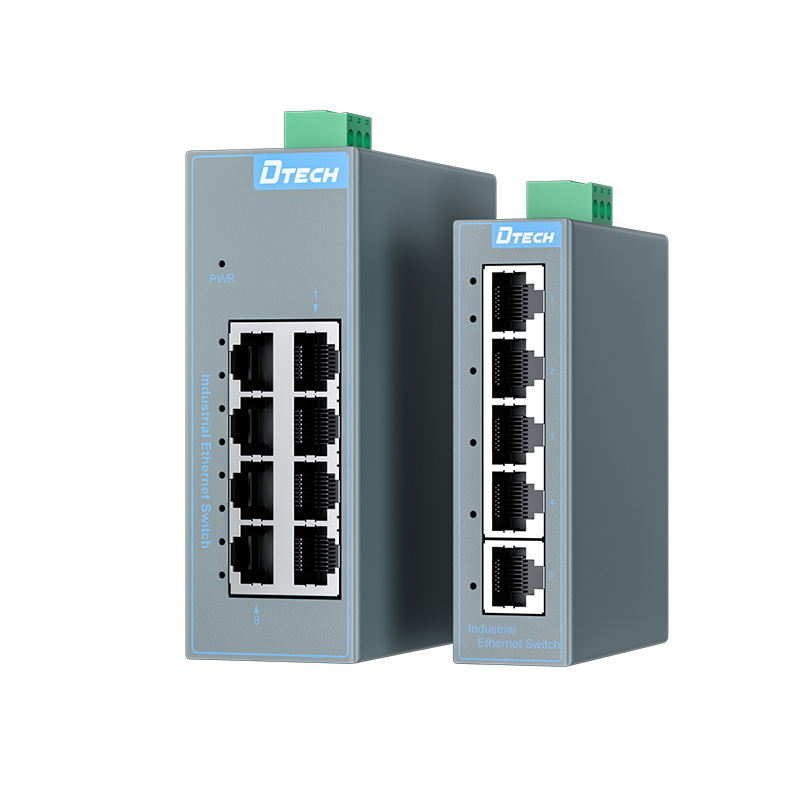
A compact cabinet may contain:
PLC
↓
HMI
↓
Industrial Camera
↓
Industrial PC
↓
Uplink
In this type of configuration, the engineer first counts the required Ethernet connections before selecting the switch.
Do not choose the port count based only on the number of devices today. Consider whether additional Ethernet equipment may be added during the equipment lifecycle.
The SW1000 family provides two network-speed options.
10/100 Mbps.
10/100/1000 Mbps.
The 5-port and 8-port Gigabit models provide 10 Gbps and 16 Gbps switching capacity respectively.
Do the connected devices actually support Gigabit Ethernet?
If they do not, selecting a Gigabit switch does not automatically make the connected devices operate at Gigabit speed.
The switch should therefore be selected as part of the entire network architecture.
The SW1000 supports:
DC 12–52V
The documentation identifies 12V, 24V and 48V DC applications within this range.
This is useful when the industrial system already uses compatible DC power.
However, the installation manual also provides an important wiring warning: V+ and V- should not be reversed. The grounding connection should also be reliably connected according to the installation guidance.
This is one of the most important selection checks.
For SW1000:
Operating: -30°C to +70°C
Storage: -40°C to +80°C.
These values describe different conditions.
If the switch is expected to operate at -35°C, for example, the documented operating range does not support that condition.
That distinction should be made before product selection.
The SW1000 uses:
DIN 35 Rail
and
Fanless Natural Cooling.
It also has an IP40 enclosure rating.
This makes the installation format suitable for compatible control cabinets and equipment enclosures.
The documented protection specifications include:
| Protection | Specification |
|---|---|
| Contact ESD | ±6 kV |
| Air ESD | ±8 kV |
| Network surge common-mode | 2 kV |
| Network surge differential-mode | 1 kV |
These specifications should be evaluated together with the site's grounding and electrical protection design.
Ask what the network actually requires.
If the application requires advanced network management functions, engineers should evaluate a managed industrial switch.
If the requirement is primarily local Ethernet connectivity with straightforward deployment, an unmanaged switch can be considered.
The SW1000 Series is designed for:
Plug-and-play + Zero Configuration.
| Application Requirement | Suggested SW1000 Configuration |
|---|---|
| 5 × 10/100 Mbps ports | SW1000-5FT-BU-2D |
| 8 × 10/100 Mbps ports | SW1000-8FT-BU-2D |
| 5 × Gigabit ports | SW1000-5GT-BU-2D |
| 8 × Gigabit ports | SW1000-8GT-BU-2D |
| DC industrial power | 12–52V |
| DIN cabinet installation | DIN 35 Rail |
| Unmanaged deployment | Plug-and-play |
The four model configurations and their core specifications are documented in the SW1000 specification sheet.
Before ordering, confirm:
☐ Port count
☐ Ethernet speed
☐ DC voltage
☐ Operating temperature
☐ DIN-rail compatibility
☐ Cabinet thermal conditions
☐ Grounding
☐ Network protection requirements
☐ Managed/unmanaged architecture
☐ Future expansion requirements
This approach helps prevent selecting a switch based on a single specification while overlooking system-level requirements.
© droits dauteur: 2026 Guangzhou Dtech Electronics Technology Co.,Ltd. Tous les droits sont réservés.

